Kaomoji – copy and paste Japanese text faces
Need a kaomoji for exactly how you feel – shy (〃▽〃), a shrug ¯\_(ツ)_/¯, a table flip? Pick a feeling or search, tap a face, and it is on your clipboard.
Kaomoji picker
- 1Pick a feeling or search
- 2Tap a face to copy it
- 3Paste it anywhere
Copied
Now paste it: Ctrl+V (⌘V on a Mac), or long-press → Paste on a phone.
Tap ☆ on any face to keep it here.
Faces you copy will appear here.
Pick a part in each row — the face updates as you go.
What is a kaomoji?
A kaomoji (顔文字, “face characters”: 顔 kao means face, 文字 moji means characters) is a face typed from ordinary text characters and read upright, without tilting your head. That alone sets it apart from the Western :-), which you read sideways. The other difference is where the feeling sits: in a kaomoji the eyes do most of the work. (^_^) smiles with its eyes, (T_T) has tears running down its cheeks, and the semicolon in (-_-;) is a drop of nervous sweat borrowed from manga.
The style grew up on ASCII NET, an early Japanese online service, where Yasushi Wakabayashi is credited with the original kaomoji. Shift JIS let people mix kana, kanji, Greek and Cyrillic letters into faces, and 2channel users later raided other scripts for new expressions – the Kannada ಠ of (ಠ_ಠ) is the best-known catch (Wikipedia has the full history).
How to copy and paste kaomoji here
- Pick a feeling or search. Tap a chip – Popular, All, Happy, Crying, Table flip, Cats and so on; All feelings (41) opens the full list, and every chip shows how many faces it holds. Or type into Search kaomoji: “bear”, “shrug”, “sorry” and “table flip” all work, capitals and accents don’t matter, and a symbol works too – ω finds every face with that cat mouth. When you type two words, a face has to match both.
- Tap a face to copy it. It goes to your clipboard at once and “Copied (ノ◕ヮ◕)ノ*:・゚✧” pops up – no selecting, no Ctrl+C. The Copied bar above the faces keeps the last one in view. If your browser blocks copying, the message says so and shows the face to press and hold instead.
- Paste it anywhere – chat, bio or game name.
Popular holds the thirty faces people ask for by name, with the name under each, so you can find “shobon” without knowing what it looks like. Tap ☆ to keep a face under Favorites; Recent keeps the last 30 you copied, newest first. Both lists stay in your browser. With a keyboard, Tab to a face and press Enter or Space. To type faces without this page, see how to type kaomoji on Windows, Mac, iPhone and Android.
Which kaomoji fits which feeling?
When I choose a face, I look at the eyes and mouth first. They set the mood; arms, hearts and sparkles only turn the volume up.
| Feeling | Eyes and mouth to look for | Example | Safe on older phones? |
|---|---|---|---|
| Happy | ^ ^ or ◕ ◕ eyes, ‿ smile | (◕‿◕) | Yes |
| Crying | ╥ ╥ or T T eyes, ﹏ wobbly mouth | (╥﹏╥) | Yes |
| Angry | ` ´ slanted brows, 益 gritted teeth | (`益´) | Yes |
| Blush & shy | 〃 cheek marks, ▽ open mouth | (〃▽〃) | Yes |
| Surprised | ° ° wide eyes, □ open mouth | (°□°) | Yes |
| Nervous & sweating | ; sweat drop beside the face | (-_-;) | Yes |
| Sorry & bowing | m m hands, _ _ lowered head | m(_ _)m | Yes |
| Cats | ω mouth, =^ ^= whiskers and ears | (=^・ω・^=) | Yes |
| Bears | ʕ ʔ ears, ᴥ snout | ʕ•ᴥ•ʔ | ⚠ ᴥ may be a box |
| Disapproval | ಠ ಠ staring eyes | (ಠ_ಠ) | ⚠ ಠ may be a box |
Wikipedia’s list of emoticons records the classic readings, such as troubled (>_<). For the stories behind famous faces, read Kaomoji meanings.
Anatomy of a kaomoji: build your own in the Maker
Almost every kaomoji is the same sandwich: arms outside, then the face outline, cheeks, eyes and a mouth in the middle, with an optional extra at the end. Small parts matter: ; is sweat, * or 〃 are blushing cheeks, ヽ and ノ are raised arms, and ゞ is a hand at the back of the head, as in the sheepish (^^ゞ.
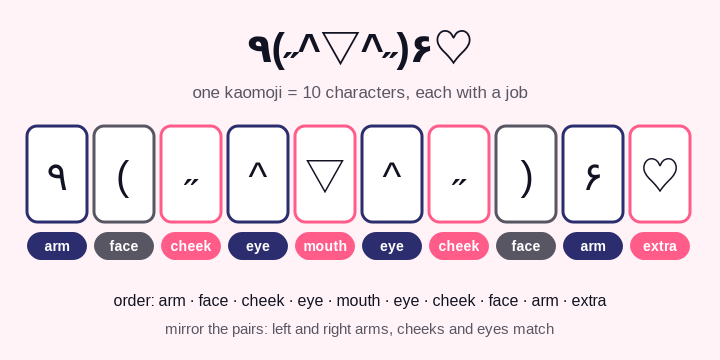
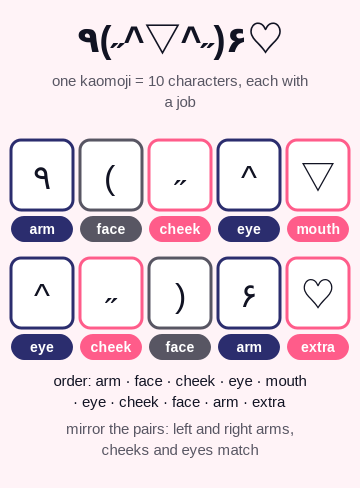
The Maker tab puts this into practice. Choose Arms, Face, Cheeks, Eyes, Mouth and Extra, and the preview joins them in a fixed order: left arm, left edge of the face, left cheek, left eye, mouth, right eye, right cheek, right edge, right arm, extra. Three worked examples:
- Cheering. Arms ヽ ノ, Face ( ), Eyes ´ `, Mouth ▽, no cheeks. ヽ + ( + ´ + ▽ + ` + ) + ノ = ヽ(´▽`)ノ – 7 characters.
- Happy with a heart. Arms ٩ ۶, Face ( ), Cheeks ˶ ˶, Eyes ^ ^, Mouth ▽, Extra ♡. ٩ + ( + ˶ + ^ + ▽ + ^ + ˶ + ) + ۶ + ♡ = ٩(˶^▽^˶)۶♡ – 10 characters, no ⚠.
- Bear. Face ʕ ʔ, Eyes • •, Mouth ᴥ. ʕ + • + ᴥ + • + ʔ = ʕ•ᴥ•ʔ – 5 characters, and the preview shows ⚠ because ᴥ is a rare character.
The character count helps with display names and game tags. Random face rolls a new combination; Copy face and Save to favorites keep the good ones. My one rule: mirror the pairs, or the face looks lopsided.
Kaomoji in Discord, Reddit and Telegram
The classic complaint: you paste ¯\_(ツ)_/¯ into Discord and the left arm vanishes. Discord formats messages with Markdown; its help page lists *italics* or _italics_, __underline__, ~~strikethrough~~, ||spoilers|| and `code`. In Markdown a backslash in front of a punctuation mark is an escape – the CommonMark specification spells out the rule – so \_ prints a plain underscore and the backslash itself disappears. The shrug arrives as ¯_(ツ)_/¯.
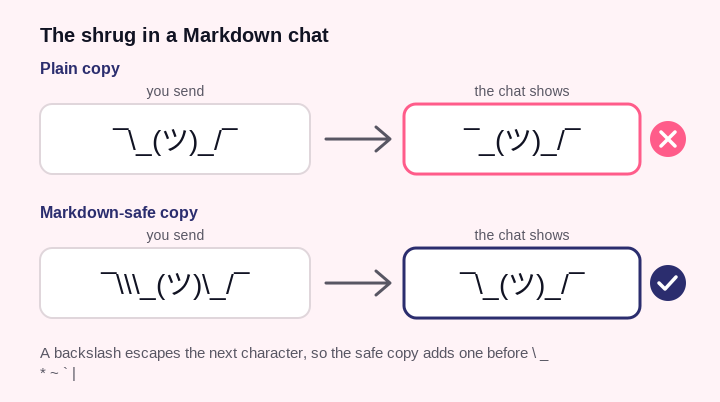
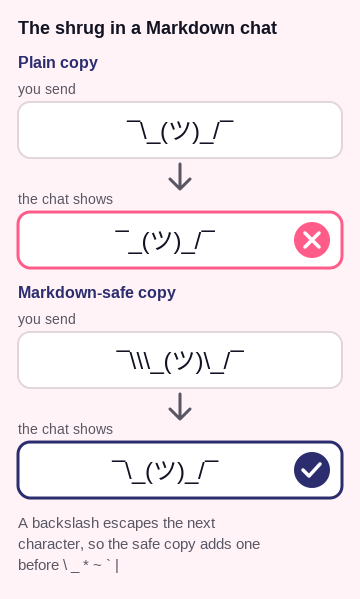
Switch on Markdown-safe copy and every \ * _ ~ ` | in a face gets a backslash in front of it as you copy. Nothing else changes:
- ¯\_(ツ)_/¯ is copied as ¯\\\_(ツ)\_/¯ and shows as ¯\_(ツ)_/¯.
- (*^_^*) is copied as (\*^\_^\*).
- (´・ω・`) is copied as (´・ω・\`).
- (◕‿◕) has none of those characters and is copied unchanged.
The toast then reads “Copied, Markdown-safe”, and the Copied bar shows the escaped text exactly as it will be pasted. Switch it off for places without Markdown, such as a bio or a game name, where the backslashes would show. My quick test: if typing *word* turns the word italic, you want the switch on.
Why some kaomoji show as boxes
A kaomoji is plain text, so the person reading it needs a font that contains every one of its characters. When the font lacks one, the phone draws an empty box – “tofu” – in its place, and a face like ( ͡° ͜ʖ ͡°) falls apart. You won’t see it on your own screen; your reader will.
The usual suspects are letters borrowed from distant scripts: the Kannada ಠ, the combining marks that hang the Lenny face’s eyebrows and nose, the Canadian syllabics of ᕦ(ò_óˇ)ᕤ, the ᴥ snout of ʕ•ᴥ•ʔ. Faces with any of these carry a small ⚠: “May show as boxes on older phones”. Can’t check how it will look? Switch on Basic characters only and every ⚠ face leaves the grid.
How the collection was put together
None of these lists were pasted from another site. The collection holds 1,501 faces in 41 feelings. It starts with the classic folk faces everyone uses, plus faces I wrote myself for each category – 1,018 chosen by hand. The other 483 were composed from parts the way the Maker works, with a palette per feeling (tear eyes for Crying, ω mouths and ฅ paws for Cats), mirrored pairs only, each face in one category, no duplicates, odd ones thrown out by eye.
The ⚠ is not a guess. Every character is checked against a list of Unicode blocks that ordinary phone fonts cover – Latin, Greek, Cyrillic, box drawing, shapes, kana, the main kanji block, full-width forms and a few more from the Unicode code charts. One character outside the list earns the mark. The character count is the number of Unicode code points; some apps count differently, so leave a spare character under a hard limit. The tool is tested against these cases:
| Feature | Input | Expected result |
|---|---|---|
| Markdown-safe copy | ¯\_(ツ)_/¯ | ¯\\\_(ツ)\_/¯ |
| Markdown-safe copy | (*^_^*) | (\*^\_^\*) |
| Markdown-safe copy | (´・ω・`) | (´・ω・\`) |
| Markdown-safe copy | (◕‿◕) | (◕‿◕), unchanged |
| Basic characters | (╯°□°)╯︵ ┻━┻ · ٩(◕‿◕)۶ · ┐( ̄ヘ ̄)┌ | basic, no ⚠ |
| Basic characters | ( ͡° ͜ʖ ͡°) | ⚠ – U+0361, U+035C, U+0361 |
| Basic characters | (ಠ_ಠ) · ʕ•ᴥ•ʔ | ⚠ – U+0CA0 twice · ⚠ – U+1D25 |
| Maker | Arms ヽ ノ, Eyes ´ `, Mouth ▽ | ヽ(´▽`)ノ |
| Maker | Cheeks * *, Eyes ^ ^, Mouth ω | (*^ω^*) |
| Character count | ¯\_(ツ)_/¯ · (╯°□°)╯︵ ┻━┻ | 9 characters · 12 characters |
| Recent | copy A, then B, then A again | A, B (newest first, no repeat) |
| Recent | 31 different faces in a row | 30 kept, newest first; the oldest drops off |
One honest limit: the ⚠ rule reads Unicode blocks, not your reader’s phone. Read it as “check before you rely on it”. Unsure when a face beats an emoji? See Kaomoji vs emoji vs emoticons.
Kaomoji questions
What does uwu mean?
It is a cute, happy face: the two u’s are closed eyes and the w is a small mouth. Wikipedia’s list of emoticons gives its meaning as joy or cute; it is of Japanese origin and spread widely online.
How do I flip a table in text?
(╯°□°)╯︵ ┻━┻ is the table flip, and ┬─┬ノ( º _ ºノ) is the calm reply that puts it back. Both sit under Popular and the Table flip chip – one tap copies them.
Why did my shrug lose an arm in Discord?
Discord uses Markdown and reads \_ as an escaped underscore, so the backslash disappears. Turn on Markdown-safe copy, copy the shrug again and paste.
Is it free, and is anything saved?
It is free and needs no account. Favorites, Recent and your settings are kept in your own browser; the faces you copy are not sent anywhere.
What is the difference between kaomoji and emoji?
An emoji is a single picture character drawn by your device’s font; a kaomoji is a face built from several ordinary characters, like (^_^). The guide on kaomoji vs emoji compares them in detail.
Kaomoji guides
 How to type kaomoji on Windows, Mac, iPhone and AndroidThe Windows kaomoji panel, the facemarks key hidden on iPhone, and shortcuts that turn “shrugg” into ¯\_(ツ)_/¯.5-minute read
 Kaomoji meanings: what (´・ω・`), orz and other famous faces sayA table of famous faces with their names and meanings – shobon, dogeza, orz, the Lenny face – and how to read a face you’ve never seen.5-minute read
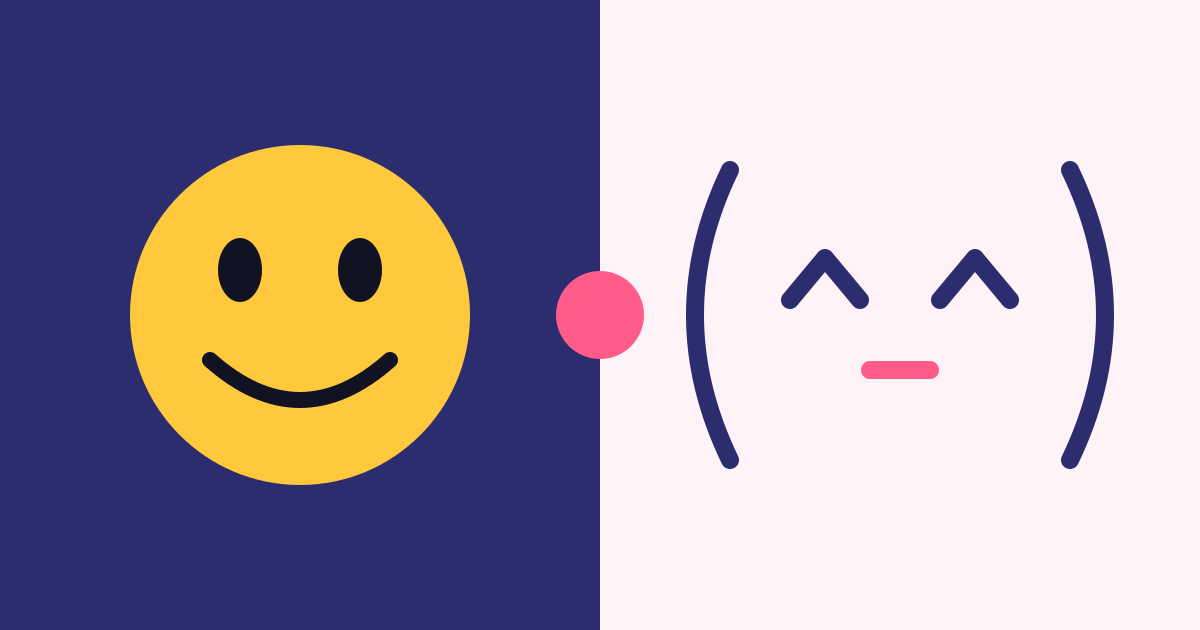 Kaomoji vs emoji vs emoticons: what's the difference?One is a picture, one is upright text, one is sideways text. How they differ in looks, length and support – and when to use which.5-minute read
Updated · About this site